In this video, I have explained how to save API base URL in environment variables using Postman. When we are using Postman for API testing, for each API we need to enter base URL OR if our API base URL is changed we need to do modification for each saved API URL. So, if we used environment variable to store base URL then we can easily change it any time.
Showing posts with label #postman. Show all posts
Showing posts with label #postman. Show all posts
Sunday, 9 June 2024
How to save API base URL in environment variables using Postman ?

Saturday, 8 June 2024
How to import JSON file in Postman || Upload JSON file as collection in Postman
In this video, I have explained how to import JSON file in Postman. If we have existing Postman or API collections, so we can transfer that collection using JSON file. Postman provides facility to upload JSON file which will create collections in Postman.
How to export Postman collection to JSON file ?
In this video, I have explained , how we can export our existing Postman collection to JSON file. So, that we can share same collection with others.
Saturday, 1 June 2024
How to save API response in Postman ?
In this video , I have explained how to save API response in Postman so that you can refer it later.
Sunday, 15 August 2021
How to turn off SSL certificate verification in Postman ?
Please follow below steps to turn off SSL certificate verification in Postman :-
1)Open Postman app.

2) Then click on gear icon. So you will get this menu. Select settings option.

3) In settings pop up, click on general tab. In general tab, tap on SSL certificate verification toggle button to turn it off.

Watch my YouTube video on this topic:-
Saturday, 14 August 2021
How to enable dark mode in Postman ?
Please follow below steps to enable dark mode in Postman :-
1)Open Postman app.

2) Then click on gear icon. So you will get this menu. Select settings option.
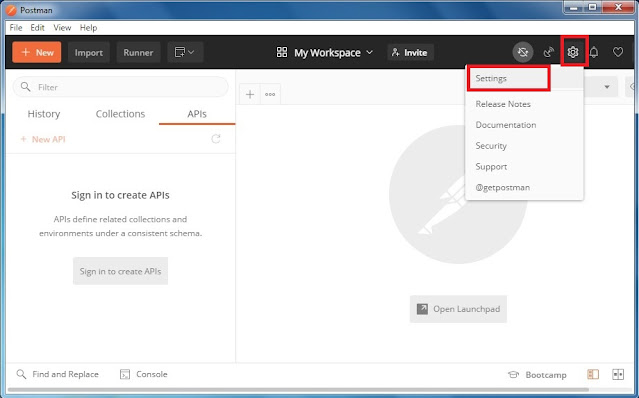
3) In settings pop up, click on themes tab.

4) Here, there are two themes light and dark. So, to enable dark theme/mode in postman, click on second theme.
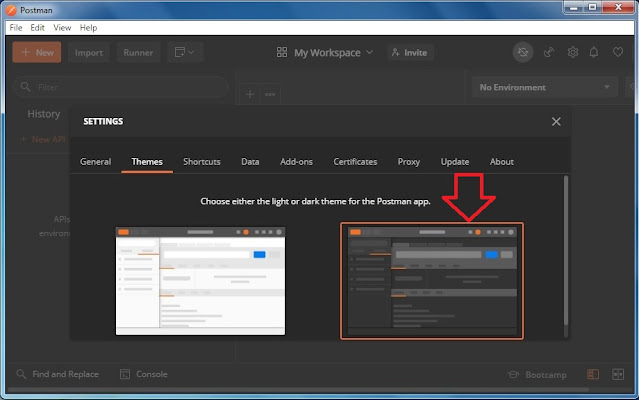
So, in this way we can enable dark mode in Postman.
Watch my YouTube video on this topic:-
Subscribe to:
Posts (Atom)