Showing posts with label textbox. Show all posts

Sunday, 22 August 2021

Add, remove and toggle css class using jQuery

Hi guys , in this post we will see how to add, remove and toggle css class using jQuery.  As we know that jquery is library of javascript which can be used to do css manipulation. Let's see it practically.
    In this demo, we will add one paragraph element and three buttons one for adding css class, one for removing css class and one for toggling css class.

Add, remove and toggle css class using jQuery

Please follow below steps:-

 1)Open your editor such as visual studio/notepad.

   2)Add html, head, script and body tag.

   3) Add CDN links for jquery .js files in head tag:-            

<script src="https://ajax.googleapis.com/ajax/libs/jquery/3.5.1/jquery.min.js"></script>  

4) Add one paragraph element and three buttons one for adding css class, one for removing css class and one for toggling css class.

 <p>This is sample text.</p><br/>

  <button Id="btnAddClass">Add Css Class</button>

  <button Id="btnRemoveClass">Remove Css Class</button>

  <button Id="btnToggleClass">Toggle Css Class</button>

 5) Add css class in style section.

   <style type="text/css">
    .SampleText
        {
          color:red;
          font-size:50px;
        }
    </style>
 6) Add following jquery code in script section.

  <script type="text/javascript">
$(document).ready(function(){
$('#btnAddClass').click(function(){
$('p').addClass('SampleText');
});
$('#btnRemoveClass').click(function(){
$('p').removeClass('SampleText');
});
$('#btnToggleClass').click(function(){
$('p').toggleClass('SampleText');
});
});
</script>

In above code, add document ready function to check whether DOM is fully loaded. Then add three click event handler for three buttons. You can use following method to do css manipulation.
   
    addClass() method is use to add css class to html elements.
    removeClass() method is use to remove css class from html elements.
    toggleClass() method is use to toggle css class to html elements.

Full Code:-

<html>

<head>

<style type="text/css">

.SampleText

{

  color:red;

  font-size:50px;

}

</style>

<script src="https://ajax.googleapis.com/ajax/libs/jquery/3.5.1/jquery.min.js"></script>

<script type="text/javascript">

$(document).ready(function(){

$('#btnAddClass').click(function(){

$('p').addClass('SampleText');

});

$('#btnRemoveClass').click(function(){

$('p').removeClass('SampleText');

});

$('#btnToggleClass').click(function(){

$('p').toggleClass('SampleText');

        });

});

</script>

</head>

<body>

  <p>This is sample text.</p><br/>

  <button Id="btnAddClass">Add Css Class</button>

  <button Id="btnRemoveClass">Remove Css Class</button>

  <button Id="btnToggleClass">Toggle Css Class</button>

</body>

</html>

Saturday, 21 August 2021

jQuery Datepicker || How to show calendar control in textbox ?

Hi guys, in this blog post we will see how to show calendar control on focus of textbox. Calendar control is very useful when you want to take date as input from user in your application.So, let's see it practically.

jQuery Datepicker

Please follow below steps:-

   1)Open your editor such as visual studio/notepad.

   2)Add html, head, script and body tag.

   3) Add CDN links for jquery .css and .js files in head tag:-            

    <link rel="stylesheet" href="http://code.jquery.com/ui/1.12.1/themes/base/jquery-ui.css">

    <script src="https://code.jquery.com/jquery-1.12.4.js"></script>

    <script src="https://code.jquery.com/ui/1.12.1/jquery-ui.js"></script>

4) Add one textbox control in body tag.

   Select Date:<input type="text" Id="btnDate">

 5) Add document ready function in script tag.

 6) Find the control by jquery id selector and call datepicker method as:-
    
    $('#btnDate').datepicker();

 7)Set properties 
                changeMonth: true, //to change month on calendar control
        changeYear: true,   // to change year on calendar control
dateFormat:"dd/mm/yy" //To set date format on date.

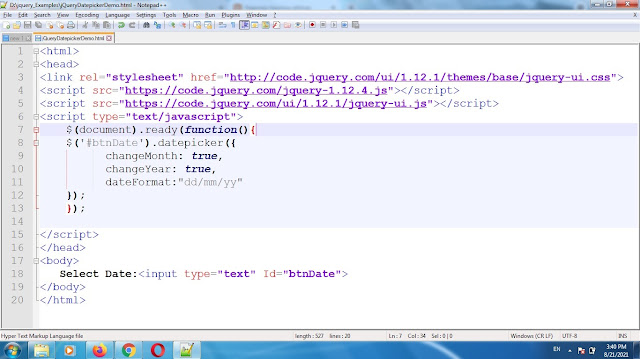
  So, code will be like this:-

    <script type="text/javascript">
$(document).ready(function(){
$('#btnDate').datepicker({
      changeMonth: true,
      changeYear: true,
  dateFormat:"dd/mm/yy"
});
});
     </script>

Full Code:-

<html>

<head>

<link rel="stylesheet" href="http://code.jquery.com/ui/1.12.1/themes/base/jquery-ui.css">

<script src="https://code.jquery.com/jquery-1.12.4.js"></script>

<script src="https://code.jquery.com/ui/1.12.1/jquery-ui.js"></script>

<script type="text/javascript">

$(document).ready(function(){

$('#btnDate').datepicker({

      changeMonth: true,

      changeYear: true,

      dateFormat:"dd/mm/yy"

});

});

</script>

</head>

<body>

   Select Date:<input type="text" Id="btnDate">

</body>

</html>

Screenshot of code:-

jQuery Datepicker


Tuesday, 17 August 2021

Check textbox is empty in jQuery | jQuery empty textbox validation

In this tutorial, we will see how we can do jQuery empty textbox validation or how to check textbox is empty in jQuery. 

In this example, we are going to add one textbox control and one button control. When textbox is empty and validate button is clicked,then application will show validation message.

 Please follow below steps:-

1)Open notepad or any editor of your choice.

2)Add html, head, script and body tag.

            <html>

            <head>

                <script></script>

            </head>

        <body>

        </body>

        </html>

3)Add jQuery CDN link in head section.

<script src="https://ajax.googleapis.com/ajax/libs/jquery/3.5.1/jquery.min.js"></script>

4) Add textbox control and button control in body tag as below:

   Name:<input type="text" Id="txtName"/> <input type="button" value="Validate" Id="btnValidate">

5)Add jQuery code in script tag in head section.

<script type="text/javascript">

$(document).ready(function(){ $('#btnValidate').click(function(){ if($('#txtName').val().trim().length==0) alert('Please enter your name.'); }); }); </script>

Full Code :-

<html>

<head>

<script src="https://ajax.googleapis.com/ajax/libs/jquery/3.5.1/jquery.min.js"></script>

<script type="text/javascript">

$(document).ready(function(){

$('#btnValidate').click(function(){ 

if($('#txtName').val().trim().length==0) 

  alert('Please enter your name.');

});

});

</script>

</head>

<body>

    Name:<input type="text" Id="txtName"/>

<input type="button" value="Validate" Id="btnValidate">

</body>

</html>

Screenshots:-

Check textbox is empty in jQuery | jQuery empty textbox validation


Output:-

Check textbox is empty in jQuery | jQuery empty textbox validation